YouGooDai
Mobile of the Day

YouGooDai

5.0 FREE
  • Screenshot 1
  • Screenshot 2

Description

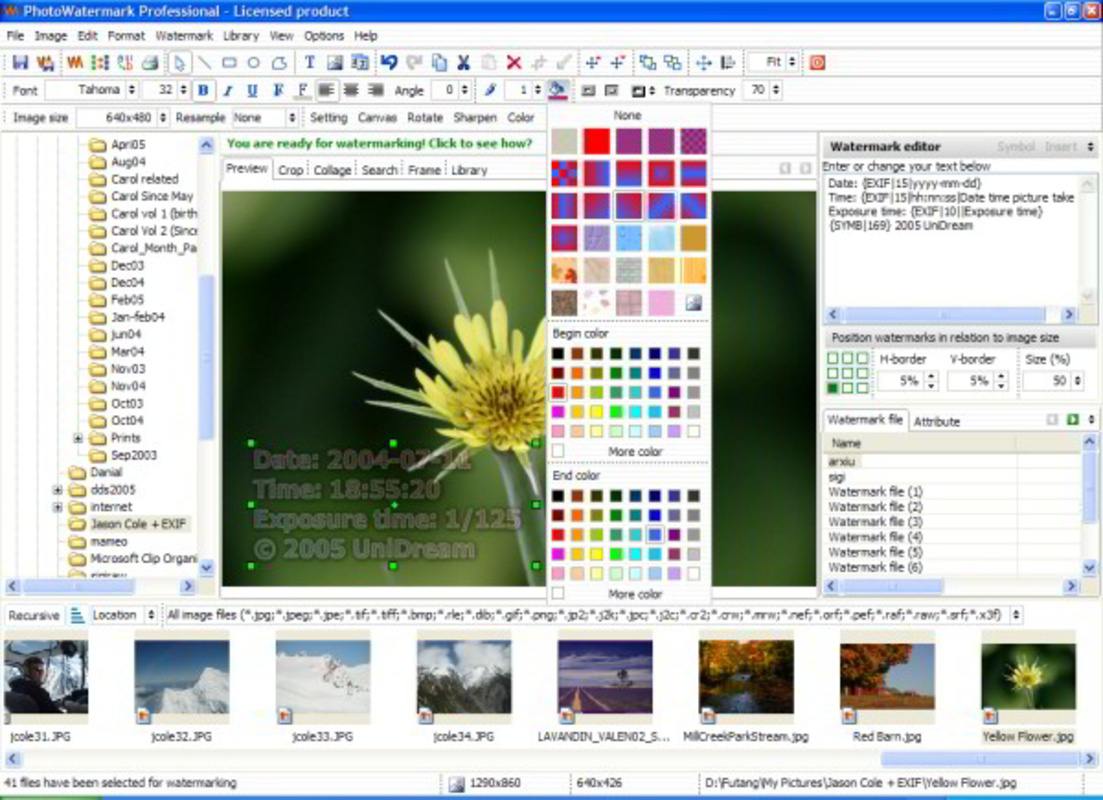
About UniDream Photo Watermark PROUniDream Photo Watermark PRO is an essential tool for photographers and leisure travelers looking to protect their images. The software offers seamless integration for adding text or image watermarks, ensuring that your brand or special memories are always visible. Its user-friendly interface and customizable options enhance the watermark application process, making it ideal for batch processing. Features of UniDream Photo Watermark PRO - Custom Watermark Options: You can create personalized watermarks using either text or images. This flexibility allows you to incorporate logos, signatures, or any graphic that represents your brand or personal style, making your photos uniquely yours. - Batch Processing Capability: UniDream Photo Watermark PRO supports bulk processing, allowing you to apply watermarks to multiple photos simultaneously. This feature saves time and ensures consistency across all your images, making it perfect for professional use. - Transparency Adjustment Tool: The software includes a tool for gradually adjusting watermark transparency, allowing you to blend your watermark seamlessly into the background. This feature ensures that your watermark remains visible yet unobtrusive, enhancing the overall aesthetic of your photos. - Save Custom Watermarks: Users can save multiple customized watermarks for future use. This feature is particularly beneficial for those who frequently update their branding or change motifs, ensuring that you can easily access and apply your personalized designs. - User-Friendly Interface: UniDream offers a straightforward and intuitive interface, making it accessible for users of all levels. The easy navigation helps you quickly learn how to add and customize watermarks efficiently without extensive training. Release Date of UniDream Photo Watermark PRO 2007-09-28Reviewed by Arnold A. HoweShow MoreShow Less

Guides & Tutorials for UniDream Photo Watermark PRO

How to install UniDream Photo Watermark PRO
  1. Click the Preview / Download button above.
  2. Once redirected, accept the terms and click Install.
  3. Wait for the UniDream Photo Watermark PRO download to finish on your device.
How to use UniDream Photo Watermark PRO

This software is primarily used for its core features described above. Open the app after installation to explore its capabilities.

User Reviews for UniDream Photo Watermark PRO 0

    No reviews found

Similar Apps
